Background Coding Agents: Supercharging Downstream Consumer Dataset Migrations (Honk, Part 4)

This is part 4 in our series about Spotify's journey with background coding agents (internal codename: “Honk”) and the future of large-scale software maintenance. See also part 1, part 2, and part 3.
In Part 2, we explored how we enabled our Fleet Management tools to use agents to rewrite our software automatically. We also explored how to write good prompts that allow the agent to best work without needing human input. In this blog post, we give a case study of how one team at Spotify used Honk with our Backstage and Fleet Management platforms to ease the pain of migrating thousands of dataset consumers onto new dataset versions — saving an estimated 10 engineering weeks in the process. We also share what we learned about how to make our data landscape more autonomous-coding-agent–friendly in the process.
Dataset migrations can be painful
As any data team knows, getting users to migrate to new endpoints can be a slow and painful process, both for the data owners and the downstream teams that use the datasets day-to-day.
At the end of last year we needed to deprecate two of the most heavily-used user datasets in order to release new versions with additional dimensions that would unlock new features. These deprecated datasets had ~1,800 direct downstream data pipelines between them and indirectly impacted several thousand more across the entire company.
We faced the prospect of migrating ~1,800 direct downstream data pipelines in only six months, across three very different pipeline frameworks that we use at Spotify: the SQL-based BigQuery Runner and dbt frameworks, and the Scala-based Scio.
We estimated that it would have taken around 10 engineering weeks of effort to complete these migrations manually. Facing that much work, we explored how Backstage, Fleet Management, and Honk might be able to automate some of the complexity.
Simplifying fleet migrations with Backstage
Before we could begin making any code changes, we had to first understand the lineage of our deprecated datasets so we would know which repositories to make those changes in. This is where Backstage’s endpoint lineage and Codesearch plugins came in.
Each endpoint’s Backstage page gave a clear list of downstream consumers, giving us an immediate sense of the scale of our migration. With Codesearch, we wrote queries that would find target repositories across the Spotify GitHub Enterprise landscape, and mark them as in-scope for our migrations, which we orchestrated using our Fleetshift plugin.
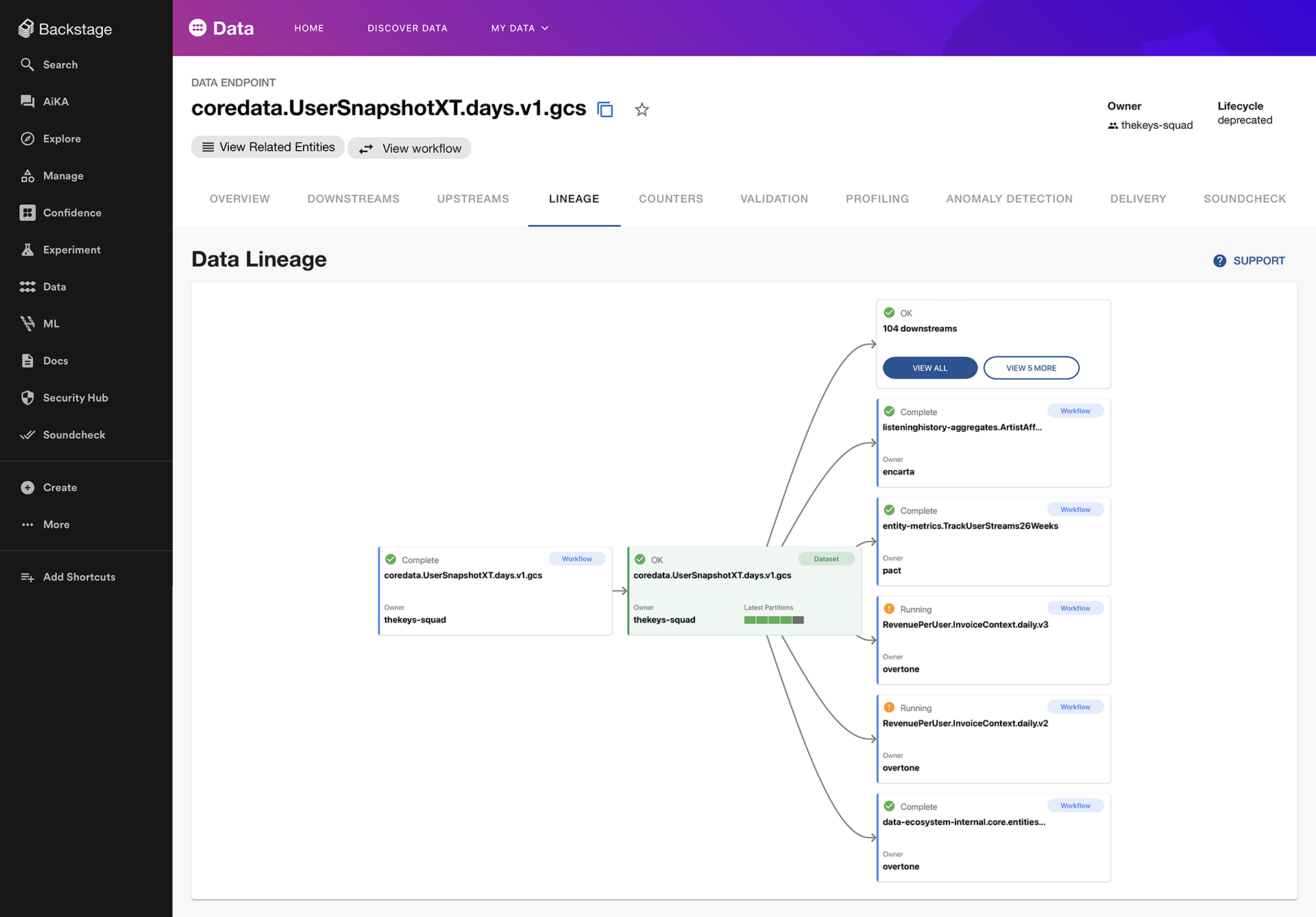
Backstage displays the lineage for any data endpoint to help both owners and consumers understand dependencies throughout Spotify’s entire software ecosystem
With Honk, context is key
As we discussed in Part 2, context engineering is a key part of the process when working with background coding agents. With our target repositories now identified quickly via Backstage, this was the part of the build that took the most time and iteration to get right, and also where we learnt the most.
One of the major challenges for Honk in this migration was the fact that it had to deal with three different data pipeline frameworks, two of which are reasonably consistent in style and substance across the company (BigQuery Runner, dbt), and one of which isn't (Scio). This lack of standardisation across our data landscape made it hard to write all-in-one prompts for Honk that could truly capture all available permutations of what it would encounter.
Although we are adding these features now, at the time of these migrations, Honk did not have access to Claude skills or custom configurability when it runs. This was a design choice made to establish guardrails around the range of possible outcomes during the migration. This meant that the prompt given to it had to be comprehensive, because it could not do things like use MCPs to go and read dataset schemas that you had not given it, or read external documentation for more context.
Trying to write a good, fully-comprehensive prompt for Scio pipelines, which can vary hugely between teams due to the relative flexibility that the framework provides, got very unwieldy without having access to outside Claude skills. We therefore made the decision not to continue trying to make Scio migrations work at that time, and focused on the other two pipeline frameworks.
For the dbt and BigQuery Runner pipeline frameworks, which were much more standardised, we initially attempted to generate a good context file by asking Claude to re-purpose a migration guide that was written for human engineers. However, the resulting context was not comprehensive enough, and Honk was left to make assumptions about how to map from one dataset field to another that were often incorrect. Once we adjusted for this, and made all mappings clear using tables in the context file — keeping in mind that Honk could only access the context we had written for it and little else — we began to see solid performance across the majority of target repositories.
Having these fine-grained instructions also allowed us to specify where Honk shouldn’t try to perform a field migration, for example, in cases where a use case–specific judgement call was required. In these cases, we asked Honk to leave the fields unchanged, but to add comments above them with links to human engineer migration guides to make the task as easy as possible for the team that would later review the pull request.
One final challenge we encountered was that, unlike with Scio pipelines, the BigQuery Runner and dbt repositories across the company rarely used any build-time unit testing. This meant that one of Honk’s key features, its ability to verify its work and then adjust based on the results, was unavailable to us, and we had to rely on the downstream owning teams to perform their own manual testing before merging the automated PRs.
That said, we successfully rolled out 240 automated migration PRs using Fleetshift. Here, Backstage and Fleetshift greatly simplified the ongoing monitoring and management of our shifts by providing an overview UI that gave us a snapshot view of migration progress, and the ability to easily click through and view any of the automated PRs without manually searching for the repositories. This was invaluable for troubleshooting, progress monitoring, and facilitating communication with the owning teams.

We use the Fleetshift plugin in Backstage to easily orchestrate software migrations across a handful of repos — or even thousands
What did we learn for the future
It became clear during this project that the success of using our Fleet Management tools with Honk for large-scale, complex migrations is going to depend on the strategic push to consolidate and standardise our data landscape. Similarly, we must enforce requirements for testing and validation across repositories so that agents like Honk can verify their work in an automated fashion. Both of these elements will be critical in enabling background coding agents across Spotify.
In addition to that, there are exciting features on the Honk roadmap that will also enhance its performance on complex tasks. The Honk team is working on a feature that will allow the agent to spend some time gathering its own context, for example by reading JIRA tickets or documentation, before it begins to perform code changes. This reduces the need for such comprehensive context files to be written up front, and should improve the quality of the resulting code changes by making full use of the Claude Code capabilities.
With both of these wider, strategic changes taking place, and alongside that the underlying Claude Code agents improving in capability all the time, we look forward to seeing Fleet Management using Honk excelling on tackling more and more complex migrations in the future and reducing manual toil for our engineering teams.
Learn more about Fleet Management and our background coding agent Honk:
Honk, Part 1: 1,500+ PRs Later: Spotify’s Journey with Our Background Coding Agent
Honk, Part 2: Context Engineering
Honk, Part 3: Predictable Results Through Strong Feedback Loops
On-demand webinar: How Spotify Built Honk
Now available: Fleetshift for Spotify Portal — perform complex code changes at scale, just like we do at Spotify
SHARE THIS ARTICLE